no my friend…i am afraid you are fucked, lol.
I dunno if photoshop does it well (I’m sure it does, if you click this and such and whatever) but if you want, you can send it to anyone who has photoshop (me) and they can try to do it for you. So… send me whatever, tell me what you want me to do with it (degrees of rotation) and I’ll see what I can do for ya.
hmm, thanks, thats a nice idea. BTW, my pirate is almost done. Its kinda big, so it’s taken me a while, but it’s definetly my best sprite ever!! 
Meh, im to damn lazy to do the arms yet, but heres my pirate so far. I know, this pirate never appeared in the games, but it was cool concept are, and i decided to sprite it. If im in the mood, ill do a whole sheet. What do you guys think?? Pretty spiffy i say, but thats me. I tried my best to imulate daz’s style. The proportions are a little off, but i got bored, and decided you guys wouldnt care.
Be sure to tell me whats wrong with it!
thats awsome. i dont see anything wrong with it at the moment… i wish i had mad sprite skillz too >.>
Beleive, me, it comes with discipline, and alot of rejection and shoot downs by other spriters. Also, motivation and inspiration are good too. Do something you love, like daz loves pirates, or i love…pirates, or…hell, we all like pirates.
Ah, speaking of pirates, i finished the arms on this mother. I havent added the arm cannon or energy blade cuz i want your opinions. Hows it look?? BTW, i was wondering, is that blaster a QAC, or something else that didnt make the cut??
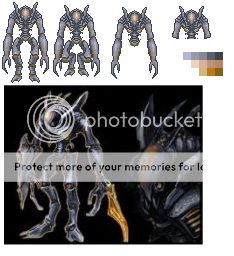
That a good pirate sprite form the concept art of Metroid Primes gallery, good job.
But what’s wrong with it? It’s not pillow shaded, is it?? Lol, ill never understand that concept.
It’s well drawn, but very pillowed, it isn’t textured right at all, and its arms are way too muscular and long.
Ah, that pillow thing again. Troid tried to explain it to me, but i still dont get it. Mabye i should just google it. And im afraid i dont know how to texture. When i try, it ends up looking like it has dark chickenpox. The arms, i can fix up like quicky.
heres 2 examples of pillow shading, and the bottom has a defined light source (the top is a more blatant version of pillow shading)
basically, pillow shading is where u just contract by 1 pixle every shade, and its very pillowy and undefined.
if u zoom in on the top version, this is very obvious.
now, the bottom version has a defined light source from the top right. this is not pillow shading, as it is realistic. pillow shading is where it looks like the light is coming from the camera.
yeah, but i dont think his picture is really that pillowed, i mean, it isn’t detailed or anything yet, right?
I just dont see the difference between using yourself as the light source, and pillowshading. Using an above light source would be good, but wouldnt that create to many shadows in my pirate since it’s standing straight up??
Here, I’ll try to explain it a little over here as well.
This image, the one I used over at MNM, is a good example of pillow shading. (once again, ignore the fact that the outlines suck along with color choice etc.) The most common form is when you shape the lighting (or “darking”) to match the outline of the sprite. Pillow shading has nothing to do with where the light is mainly coming from. It’s more of a… warped gradient. On more complex shapes, the light usually tends to come from a lot of directions (look at your Metroid Prime’s legs, Redhalberd. The lighting bends around so it comes from both directions) Notice that the lighting isn’t coming from you in the arm and leg sprites above. On the arm it’s coming from above… and to the right… somehow. On the leg it’s coming from the right mostly and from the bottom-right corner… I think. The lighting kind of warps around with the shape of the sprites
I would love to make realistic lighting on the legs and arms if I could… But I’ve just tried… And ended up making it just a different style of pillow shading.  I don’t think that leg can even have realistic lighting with that shape… At least not with my spriting skills.
Here’s another example. (You may have to zoom in)
This one shows exactly what pillow shading in its most basic form is. Just keep adding to the outline and you’ve got it. That is definitely not a sphere, no matter how far you go in with the pillow shading.
As for why pillow shading is bad… This image explains it.
Pillow shading can make sprites seem soft, plasticy, puffy, flat, thin but rock hard, etc. All of those are pretty bad unless you’re actually going for that look, in which case there are actually better ways to make that look more realistic and not so cartoony.
Just look at those circles HP posted. They look like flat circles with little designs in them. The pillow shading makes them look that way (and HP, that last one is pillow shading, just from a different part of the circle. The circle still looks like a round sheet of paper with a design on it. The lighting isn’t even round <_<)
Does this help a little more? I know I used only some of the pictures in my post at MNM, but I’m explaining it a little better, right?
Edit: And Daz, feel free to correct me where I’m wrong. I don’t sprite at all, so I know I’m going to be incorrect with a few things.
Ack, im not sure i get it, but i reshaded the pirate (and added crappy antennae) to see if this better. Could you get a more detailed example of what to do and what not to do?? I find that my problem has more to do with the sprite im shading, as opposed to my shading in general. Whenver i do facing forward sprites, i reflect both sides, which usually wherever the sun is coming from. Ill try again with a different creature tommorow.
I actually don’t see what’s wrong pillow-wise with your sprite… All I can see right now is that it’s too faded.
But… I think the big thing with shading rounded objects is that the edges get darker at an exponential rate… Like this:
(ignore the fact that that right circle obviously isn’t shaded as well as it could be, mostly a color problem, and you’ll have to zoom in to actually see what I mean here)
The whole center area is light, and as you go out, it slowly gets darker at a faster rate. The left two are obviously pillow-shaded based on the outside and the center respectively. They get darker at a constant rate while you go to the edges (though the middle one stops eventually due to my laziness)
This idea can (and should) be applied to anything round (such as the arms of the Pirate you’re making)
Edit: Oh, I see what’s wrong. The difference between the lightest section on the bigger part of the arm and the lightest section on the tiny little spot between the bigger part of the arm and the hand is too much. A few air molecules aren’t going to scatter that many photons. >_>;
Edit2: Hey, Daz, correct me in places where I’m wrong. >_>
Edit3: That works <_<
No, that’s not what’s wrong with it. The problem is that he’s pillow shaded. >_>;
You need to TEXTURE him. To break up pillow shading, you do things like add folds in clothes, wrinkles in skin… well, pirates don’t have either of those. They have varied texture from game to game–pebbly skin, which is shaded with an intricate warty texture of course, and shiny armor, which would be shaded… well, shinily. WIth big white spots to show where the light hits, and heavy shadows where it doesn’t. You gotta look at the texture of what you’re making, and shadei t accordingly. You can’t just softly follow the outline. You need more contrast, and more texture.
Pillow shading is simple, take alook at some other sprites that you done and there not pillow shades, there color is good just to much light color you need to choose a point of view where the light comes form and here an example.shading example one without pillow effect( just an example)

I may look like junk but it will give you an idea on how to shade that pirate right without the pillow effect.
I think it’s the sprite thats my problem more right now. I dont really like taking itme to reshade sprites when they already look so nice. But the way pirates have bumpy skin, i tried to emulate that with my P2D trooper, but i dont think i did very well. Ill do a side view of this pirate to try again.
more dark, more texture (look at the wrists for the dark part!)
it really boils down to the detail you put into it, you can either make it have plain stuff that while is considered shading and is simple (line for light, line for next light, etc.), or would you like to add specific bumps, and let the lighting be kinda…shifting to the details and such.